Tuesday, 5 April 2016

16 Ways to Optimize Your Product Landing Pages

If you’re in the e-commerce business and looking to increase your conversion rates, you’re in the right place. In this article you’ll learn 16 tips for optimizing your e-commerce product pages and the mindset you need to achieve explosive business growth.

optimizing product landing pages

Why Your Product Landing Pages Need Optimization

As an e-commerce store owner, you should constantly be optimizing your conversion rates and – most importantly – profits. From the landing page to the payment confirmation page, you have to optimize the flow of your visitors through each step. And one critical step is your product pages.

In this article I’ll focus on how to optimize your product landing pages’ usability and conversion rates by testing and following best practices for e-commerce pages. But remember, while conversion rate optimization best practices can guide you in improving your profits, there are no hard and fast rules.

When it comes to e-commerce conversion optimization every store is different, and what worked for somebody else might not work for you. The only way to be sure is to use A/B testing to statistically test if a best practice increases your conversion rates and sales too.

a/b testing product landing pages

So make sure to A/B test your new product page template against your old one. Never make changes to your e-commerce store without testing if they make you more or less money. That’s what I call the publish and pray technique, and it rarely helps your business grow.

Let’s get started!

1. Feature High-Quality, Dynamic Product Images of Every Product

Your product images can make or break your e-commerce conversion rates.

People like to see things before they buy them. But when you’re shopping online, you can’t hold or feel a product, all you can really do is look at it. So to make up for these shortcomings you need to work really hard on making sure your product images rock.

Use large, high-quality large images with multiple angle shots

The first key to image success is the size and quality of your images. In this case study Mall.cz tested larger images on their product pages:

product pages images

Control Design

high quality product images

Variation Design

They saw a 9.46% increase in sales when they used the larger product images. Try testing bigger product images on your category and single product pages.

Here is a checklist for other things to consider when creating your high-quality product images:

  • Clean and consistent background (white space or consistent background design, no clutter)
  • Consistent image lighting, contrast and saturation (make sure your images have the same look and feel)
  • Consistent padding around the edge of the image (minimum 30px)
  • Show the context of the product where appropriate (e.g. people wearing jewelry to understand scale and sizing)
  • Offer detailed, alternative views and 360-degree rotating images of your products where budget allows (or do this for your best-selling products)

2. Implement a product zoom feature

Since people can’t get a hold of a product when buying online, getting up close to it in the images to see details is essential.

Make sure visitors can zoom in on your products and see the finer details in HD.

zoomable product images

World Of Watches does a great job of this, offering contextual images of the watch on a wrist and high-quality zoomable images from alternative angles.

3. Increase trust and conversions with user submitted reviews

According to Marketing Land, 90% of customers say buying decisions are influenced by online reviews. And 88% of customers trust online reviews as much as personal recommendation (Search Engine Land). So it’s really important to test how adding reviews to your product pages affects your conversion rates.

reviews on product landing pages

If the reviews are in-line alongside your products, the visitor doesn’t even need to leave your page to go looking for reviews around the web.

In this case study Express Watches added customer reviews right into their product pages and saw an increase in conversion rate to sale of 58.29%.

Test adding on-page reviews (impartially submitted by users) to your single product pages and see if your conversion rates improve.

4. Use wish lists to drive traffic and increase sales

According to BigCommerce incorporating wishlists or “want” buttons helps customers remember a product they liked but couldn’t buy straight away.

want buttons on landing pages

Shopify offers an app for the Want button – these post to people’s Facebook timelines too and drive more social traffic to your store. The traffic is also primed for conversions as people love to buy what their friends recommend.

A/B test adding wishlists and want buttons to your store to drive referral sales and traffic.

5. Don’t hide out of stock products

In this case study by Marketing Sherpa, they leveraged a mixture of transactional emails and segmented email lists to increase sales and conversions.

The first step was to show out of stock products with the option to get notified when they were back in stock.

out of stock product optimization

This added the lead to a per-product lead email list. When the products were back in stock the lead email list got sent a transactional “back in stock” email, inviting them to return to the store and checkout.

In this case study these emails converted at 22.45%!

6. Increase trust by adding a privacy policy link

Visitors need to trust your brand before committing to signing up or shopping with you. So adding trust factors such as privacy policy links to forms can really help boost your conversions.

Let’s take the previous example of signing up to get notified when products are back in stock. You could further increase conversion rates by testing adding a privacy policy link to the form.

In this case study BettingExpert did just that, and saw a 19.47% increase in their form conversions.

privacy policy on landing page

Test adding privacy policy links to your get notified forms or lead generation forms on your product pages to increase conversions.

7. Link to product sizing charts on page or in a pop-up

When it comes to products like jewelry, sizing can make or break a conversion. So it’s worth testing if placing sizing information alongside the product affects your conversion rates.

sizing info for product pages

You can place a link to a sizing page as seen on the product page above, or have the sizing chart pop up as seen below:

product pages with sizing information

Always anticipate the questions your prospects will have and make those answers available to them. Test adding sizing information to your product pages to improve conversion rates.

8. Personalize your related product recommendations

You all know recommending related products is a great way to increase your average basket value and conversion rates. But to take your selling to the next level, you can add personalization to your recommendations.

According to a case study by Smart Insights: “Compared to average site conversion rate, conversion rates were increased by 332% on Millets.co.uk and 277% Blacks.co.uk where a visitor selected a personalized product recommendation.”

They looked at two types of personalization, “What customers ultimately buy recommendation” and “Rule-based cross-sell personalized recommendation.”

For example, when checking out hiking equipment, visitors were shown these personalized rule based recommendations below:

product recommendations on landing pages

A/B test using personalized product recommendations to increase your average basket value and conversion rates.

9. Use live chat transcripts to find product information gaps

So you all know the benefits of using live chat on your e-commerce websites; as long as you’re tracking those chat conversions, it’s convenient for the customer and cheaper than phone-based customer service teams.

But the real value of live chat, in my experience in testing with Olark, is in the transcripts.

With Olark you can review and even export your live chat transcripts for analysis – this is a powerful conversion tool!

live chat on product landing pages

For example, we used live chat in this e-commerce CRO case study and found there were information gaps on the e-commerce store’s product pages: things about the products the visitors wanted to know but couldn’t find answers to.

When we analyzed the transcripts from customer conversations we learned these insights:

Customer: “Hey guys, Could you please tell me if your sterling silver jewellery will tarnish if worn in salt water? Thanks”

Customer: “I was looking at the Gold ‘You are blessed’ tan bracelet and was wondering if it’s durable enough to wear everyday?”

From this we were able to create a hypothesis to A/B test: More detailed product info (perhaps behind a tabbed system for people looking for in-depth information) will mean less reservations around the purchase and more checkouts.

Analyze your live chat transcripts for product information gaps and add the missing information in-line alongside your products on the landing pages.

10. Leverage visual hierarchy to improve your product page conversions

Visual hierarchy is about guiding your visitors step by step through the different elements in your page design. The path they take and the order in which they experience your design and copy can be the difference between a bounced visitors and a checkout.

In this case study Underwater Audio improved the visual hierarchy of their landing page by changing the order of the different elements of their value proposition: the headline, features and benefits section, image and call to action.

By changing the visual hierarchy they increased sales by 35.6%.

product landing page design

Test changing the order in which visitors read the different elements of your product landing pages. For example, don’t ask them to add the product to their cart before teaching them enough about the product and its features. You can ask for the sale too early and lose it.

11. Get the length of your product page copy just right

In this guide David Crowther suggests long copy works best when your product is:

  • Expensive
  • Complex with many features
  • Part of a specialized sector
  • Not unique
  • Unsought

He also says short copy works best when your product matches these points:

  • Your product or offer is very simple and requires little explaining
  • Your price is inexpensive
  • Your call-to-action costs no money: taking a free trial, signing up for a newsletter, etc.

Make sure to test your product copy length and be more explicit and detailed for complex and expensive products.

12. Use product videos to increase conversion rates

You hear a lot in the conversion world that video sells. But the truth is, as with any conversion best practice, it depends.

For example in this case study a fitness business spoke with their customers to learn what was missing from their product pages. The main question or concern visitors had was, “How will these products look on me in a fitness class?”

This prompted the business to create better product images and videos that address this question.

product videos on landing pages

They only made a small number of videos first as a cheap test. The results showed that for search traffic, revenue per visit increased between 25% and 100%, depending on which consumer segment they were analyzing.

Test adding videos to your product landing pages (if the your data suggests you need them) and only invest in one or two videos at first to test their impact on profits. If it works as well as it did for this business, it’ll be worth rolling out more videos for your landing pages.

13. Communicate shipping on all pages clearly

It seems like a no-brainer, but so many stores I see don’t show shipping costs until much too late in the buying process. It’s important to communicate shipping costs on every page (especially your product page) and where possible to offer free shipping.

shipping on product pages

Nearly half of all online orders come with free shipping, so you should at least test if you can build shipping costs into your product pricing and see if it creates more profit.

A study by E-tailing found that 44% of people abandoned a purchase process because the shipping costs were too high.

shipping info for product landing pages

What about if you must charge for shipping in your business model?

If your product doesn’t allow for free shipping then make sure to use a flat rate fee and show it on every page. You could place it in the header and footer of your store's web page designs.

In this study 47% of people showed they would abandon a purchase if they got to buy page and learned shipping was extra. Show shipping costs upfront!

14. Show the expected delivery date on the product landing page and cart page

In the age of 30-minute drone deliveries, customer don’t expect to wait long for their products.

An infographic from Milo demonstrated that visitors are much more likely to abandon the sales funnel if they have to wait days on end for delivery times.

product landing page best practices

When asked what would encourage them to complete their purchase, 60% of respondents said a guaranteed delivery date.

Test adding expected delivery dates to your product pages or offering guaranteed delivery dates and displaying them in-line alongside your product.

15. Show an “added to cart” notification

When someone tries to add a product to their cart, you want to let them know they have been successful.

Basically, you need to constantly be giving the user feedback. This is seen as an interaction design best practice.

Essentially, feedback answers questions across four categories:

  1. Location: Where am I? (persistent navigation)
  2. Current Status: What’s happening – and is it still happening? (breadcrumbs, interface state)
  3. Future Status: What will happen next? (call to action)
  4. Outcomes & Results: What just happened? (alerts, e.g. “item added to cart” pop-up)

added to cart notification

Here you can see when you add a product to your cart on this site, you get a pop-up notification and a call to action to continue to the cart: these represent an outcome/result and future state prompt.

Test adding more interaction design best practices to your product landing pages so your customers always understand what’s going on.

16. Leverage user testing to inform and test your product page designs

Appliances Online created 125 user testing videos (giving them about 250 hours of footage) to find problems with their product pages. From these videos they found amazing insights they could then turn into hypotheses and A/B tests.

For example, many users said the pages were too busy; others said the service information needed to be more explicit and the video experience could be improved.

These improvements resulted in a 9.5% increase in sales, and 37% more visitors viewed the product videos. Visitors who viewed the videos were 57% more likely to add items to their basket, too.

Make sure use user testing to inform your testing ideas. Constant iteration and improvement is one key element to getting killer conversion rates.

Remember: Don’t blindly copy your competitors

don't copy competitors

You must remember that just because a “best practice” or a certain test increased someone else’s revenue, it won’t necessarily do the same for you.

A/B testing is a great way to improve your product landing pages and increase your conversion rates and profits, and it’s the best way to know that a change to your site or your landing page is really going to work for you.

So don’t blindly copy your competitors – they’re probably doing the same.

About the author

Giles Thomas is an e-commerce conversions expert. He’s the CEO of Whole Design Studios & founder of AcquireConvert. He is a head marketing mentor for Google and a member of the prestigious Google Experts Program. Join his free, 5-day ecommerce optimization course here.

Find out how you're REALLY doing in AdWords!

Watch the video below on our Free AdWords Grader:

Visit the AdWords Grader.


from Internet Marketing Blog by WordStream http://ift.tt/1USPLMq
via IFTTT

PX Design: Tailored User eXperience For Individuals

Personalization is the newest frontier for UX professionals. An overall positive user experience for a vast audience is obviously still a goal, but taking collected knowledge about individual users, leads, visitors, or customers whatever the case may be is a […]

Post from: Search Engine People SEO Blog

PX Design: Tailored User eXperience For Individuals

--
Written by Kyle Sanders, Complete Web Resources

The post PX Design: Tailored User eXperience For Individuals appeared first on Search Engine People Blog.


from Search Engine People Blog http://ift.tt/1PRwwut
via IFTTT

The 2016 State of Link Building Survey - Results & Analysis

Posted by Nicholas-Chimonas

[Estimated read time: 18 minutes]

SEO futurists have predicted the death of links as a ranking signal for years on end. That hasn’t happened yet, and I'm happy to say that link building as a practice has greatly evolved.

But rapid change often creates confusion, and there doesn't yet seem to be a strong consensus on how link building teams should be constructed, where they fit in the marketing plan, and how much ought to be invested into link acquisition.

To bring more clarity and transparency to a complicated pillar of SEO, I'm proud to present to you the 2016 State of Link Building Survey results!

Let’s be frank: link building has had a volatile history filled with spam, tricks, and get-rich-quick schemes. When Google introduced the first version of Penguin in April of 2012, the practice of link building received a severe shock to the system.

link building content marketing april 2012.png

“Google Trends analyzes a percentage of Google web searches to figure out how many searches were done over a certain period of time.” - Trends Help

In the minds of many, content marketing has been the modern replacement to link building. To me, this is a flawed perspective, as content marketing has many goals beyond links; link acquisition is a highly ancillary product amidst the primary goals of content marketing. Links also serve a different set of goals than content marketing.

The process was supposed to look something like this, from Rand’s Search Love deck.

rand searchlove link building slide.png

The manual promotion, the deliberate intention of earning all of the links you deserve via manual outreach, is what seems to have been missing in many marketing strategies of late.

If you’re interested in learning about how we promoted this survey, check out the methodology section below. Otherwise, hit the jump link to get straight to the questions and results. You can access this year’s raw data sheet here. I encourage you to create your own graphs/analysis with Google Sheets (Insert > Chart...) and share them in the comments! First make sure to create a copy (File > Make a copy…).

Take me straight to the survey results!

Methodology

I have immensely enjoyed the fascinating data presented in the 2013 and 2014 annual link building surveys. 2015 passed without a survey, and I felt compelled to gather updated data from the industry at large. It’s interesting to note we had 435 responses to this year’s survey, as compared to 315 total in 2014.

It’s also important to mention that this survey doesn't contain the exact same questions presented in 2014’s survey. Link building has been a constantly evolving landscape, and our survey has attempted to evolve with it.

Check out Moz’s link building category page and skim through the posts of 2015 and 2016. There are some very smart, very legitimate evergreen digital marketing strategies in there, as opposed to “the next big trick” or which tactic is on the chopping block for overuse.

As such, the questions in this year’s survey were designed to reflect link building’s evolution into a more legitimate and integrated marketing channel.

I’m not the David Bowie of the SEO world, so I knew I’d need help promoting the survey to gather an acceptable sample size. To that end I reached out to the founder of Credo, John Doherty. He’s a fellow who has bestowed plenty of wisdom upon me with his digital writings, and has conducted similar research on the average cost of SEO consultation recently. He agreed to co-author this post with me, and aid in promotion.

Beyond emailing our own newsletter subscribers of Credo and P1P, we spoke with a few people in an attempt to increase our reach with the survey. To each one of these individuals we want to express our sincere gratitude. Thank you!

Without any further ado, let’s jump into the data.

Who took the survey?

As expected, a majority of survey respondents were agencies. Link building is still typically an agency offering, despite predictions of link building moving in-house or to PR teams. In our 2016 survey, the percentage of Agency respondents versus In-House has actually increased.

41% responded as Agency in 2016 compared to 37% in 2014.

27% of respondents in 2016 selected In-House SEO compared to 30% in 2014 that responded as “SEO Manager or head of SEO”.

However, this year we segmented our In-House answer selections to include "In-House Content Marketer" and "In-House PR." In 2014, the only option potentially relevant to In-House professionals was SEO Manager, so it isn’t quite a direct comparison. That said, we had more available answer selections for In-House than before, and Agency still won out.

It’s interesting that In-House PR received so few responses. There have been many blog posts proclaiming the need for migration of link building responsibilities to PR departments, but in my experience that hasn't been reflected in reality.

In an overwhelming majority of link building campaigns I’ve been involved in, link acquisition is simply not at the forefront of the minds of PR agencies. While successful PR does create some of the highest-quality link opportunities, most of them are left on the table; they still require manual outreach to convert to links.

It’s possible our promotional efforts are the reason we didn’t reach many in the in-house PR role. However, in my experience collaborating with in-house PRs, it is very rare to encounter someone who focuses on building links.

What size of companies are actively involved with link building?

size of clients or companies worked for.png

This was a “Select as many as apply” answer set, but with a majority of respondents selecting 1–200 employees, link building appears to still reign supreme in the SMB market (although it's worth noting that 10% of respondents were from large businesses). The common line of thought is that enterprise businesses naturally earn so many links that active link acquisition isn’t as necessary.

To dive a bit deeper, I further segmented the data by respondent type with Google sheets’ Charts function. It isn’t surprising to see agencies and in-house professionals working with a higher number of larger enterprises compared to consultants, freelancers, and business owners. Still, across every respondent type, SMBs were the most popular selection.

How many people are on your link acquisition team?

how many people on your team.PNG

81% of respondents reported they work alone or in link building teams of 1–5 members. It’s possible those building the links are typically wearing many hats, with link building packaged into a larger service or part of many other in-house responsibilities.

I’ve worked with a few larger businesses’ in-house teams of full-time link builders, but it's a rarity. The largest in-house link building team I’ve worked with had 20 employees on staff. Clearly this is by no means commonplace. Most businesses either don't need or don't believe they need full-time link builders. It’s mostly SEOs — who are typically members of small teams already — that either do the work, or recognize its value and outsource to agencies with small, dedicated teams.

I also broke this out into agencies versus in-house. Although agencies did submit more responses with larger team selections, the spread is quite similar.

As you can see, there are far fewer lone wolves in an agency setting. In-House folks responded with nearly double the selections of “Just me!” compared to Agencies. In every other team size category, Agencies responded more than In-House. Keep in mind these are fairly similar sample sizes, with 180 respondents identifying as Agency and 163 as In-House.

What is the average client’s or business’s budget allocated to link building per month?

On this question, we requested in-house folks calculate the total of all link building employee's monthly salary. Being a part of a larger package or add-on duties to an in-house team could affect this spread, with over a third of respondents selecting under $1,000.

In 2016, our audience reported much lower costs for link building compared to the 2014 survey. This could be due to a different audience reached, or less focus on link building itself.

The $10K–$50K option was too large of a range in 2014, and with 0% selecting $50K+, we lowered and segmented our ranges further in 2016. This is 2014’s distribution of the same question:

2014 cost of LB graph.PNG

This year’s data becomes more interesting as you break it up by our audience’s professions. Two distinct groupings within our respondent types were exposed. Agency and In-House are similar in cost spread, with In-House having slightly more on the higher end. The other similar grouping was Consultant/Freelancer and Business Owner.

What model do you use to charge for link building services?

survey q5 model used to charge for LB.png

This spread is somewhat deceiving, as there was essentially only one answer for In-House respondents to select. 154 respondents selected the top voted answer, which would make sense with 163 identifying as In-House. Remember though, this isn’t indicative of reaching more of an In-House crowd as opposed to agencies (180 responded as Agency).

This question was structured this way specifically because there are so many different ways that Agencies and Consultants/Freelancers sell link building in 2016.

Still, this question confirmed a suspicion raised by the earlier question regarding team size. Packaging link building as part of a larger service is indeed the top-selected option for all other respondent types besides In-House, and that probably affects the necessary team size of dedicated link builders.

The responses typed in when “Other” was selected are quite interesting. A couple of “other” responses actually fit in other buckets that were options, so they aren’t included. I’ve also segmented the selections by respondent type in the pie charts below.

Agency:

“Other” entries by agency respondents:
"We sell digital PR retainers that earn media — we don't sell links.”

“It's wrapped into our monthly retainer.”

“We're a public university running on an agency model; this is included in budgets.”

Business Owners, Consultants, Freelancers:

“Other” entries by Business Owners, Consultants, and Freelancers:
"Link building is just a small part of the ‘packages’ we sell clients on.”

Author note: A comment like this indicates that some survey respondents identifying as “Business Owner” may actually be agency owners, rather than business owners that handle link building on their own. It’s possible the Business Owner data is somewhat skewed by owners of agencies. Only 9% of survey respondents identified as Business Owner, so the data should not be too far off.

Charge a flat fee for contacting a set number of websites.”

“I do it for myself.”

“Fixed plus performance-based rate.”

“I don't link build, I consult on how to do it the Google-compliant way.”

In-House:

"We don't build links at all. We create and publicize great content and the best natural links come themselves as natural by-products.”

“Everyone in the SEO/Content Team does link building as part of their jobs.”

“We have a PR person do our ‘link building.’"

What percentage of the overall SEO budget is dedicated to link building?

survey q6 what percentage of budget towards LB.png

What percentage of your SEO work/campaigns is focused on link acquisition?

survey q7 what percentage of work dedicated to lb.png

These two questions were designed to be complementary and are most interesting assessed together, rather than separately. One might assume that the % cost of link building will be equal to the % time of a campaign spent on it, but that was clearly not the case.

This data seems to suggest that as an industry we aren't charging enough for our link building services. Significantly more votes were towards a lesser percentage of budget, while spending a higher percentage of time on the service! Although 230 responses fell in the 0–25% of budget range, only 156 responses were in the 0–25% range of time spent.

An alternate explanation is that people don't put “budget” towards link building in a traditional way, but do spend significant time on it. Link building isn’t a service that is necessarily expensive in a monetary sense. Low overhead, relatively inexpensive tools, and as a later question in this survey illuminates, frequently cheap labor.

2016 is only the second year the link building survey has asked this question, and there are significant differences in our dataset compared to 2014.

53c3ea1e705420.94374006.jpg

2014 Link Building Survey responses to “What percentage of your overall SEO budget is allocated toward building links?”

In 2016, the 0–25% budget range increased from 27% to 53%. There was no change for the 26–50% budget range, remaining at 27%.

The 51–75% budget range has fallen in this year’s survey from 40% to 16%.

Here are a few possible explanations I could think of; let me know your own ideas in the comments!

  1. We may have reached a different audience than the 2014 survey. With the evenness of sample sizes between agencies and in-house, we received lesser responses of dedicated budget towards link building.
  2. We had 120 more respondents, comparing 315 in 2014 to 435 in 2016. Perhaps this contributed towards a more even spread.
  3. People are putting less dedicated budget towards link building. In the past two years, link building has become more integrated into other departments and marketing processes, packaged in as part of a holistic service, and less specialized link builders exist overall.
  4. A mix of all of the above.

What is the average salary of a link builder?

survey q8 avg salary of LBs.png

This was another question where we asked non-agency respondents to deliver a unique answer. If they were the only one responsible for link building, we requested they enter their personal salary. If multiple employees work on link building in-house, we asked for respondents to average their salaries together for a single response. All answers are in USD.

Sadly, I can’t say I’m surprised to see $20,000–$29,999 reign supreme. Here are the breakdowns by respondent type.

In-House clearly has a much more even distribution than agencies. This is probably influenced by agencies that outsource work, which makes me wish I had included a response option for “Do you outsource work?” Alas, hindsight is 20/20. I have a hunch this did affect agency salary ranges.

Another possible contributing factor to the more even spread of In-House into higher salary ranges is the types of businesses that hire in-house SEOs, content marketers, and PRs. From what I’ve observed, most in-house jobs are with larger enterprises that are located in bigger cities. The cost of living is higher, and so are the wages. Agencies, on the other hand, are in all ranges of city size, some with a lower cost of living.

I didn't originally plan to include Consultant/Freelancer or Business Owner segments in this section of analysis, but it's an interesting side note that the distributions were within 1–2% of one another.

It’s also curious that over half of Consultants/Freelancers reported earning less than $40k per year, with 35.3% reporting $50k or more for their annual salary. 11.8% reported $80k+! To me, this speaks to the low barrier of entry to link building. If you can communicate digitally and write well, there are many agencies that will train you on the technical side of link building.

With a low barrier to entry, there's an abundance of entry-level link builders, but not nearly as many with years of experience. Once you learn link building, you can grow into many different avenues — technical SEO, web development, marketing, possibly even PR. The truth is, the best link builders I know have grown branches of their skills in these ways, and naturally become a T-Shaped marketer.

Which types of clients do you work with the most?

This was another “Select all that apply”-type answer. Earlier in the survey there were indicating factors that SMBs were the most popular clientele of link building, and the data supports that. SMB won far and away, but it’s fascinating to see that B2B and B2C were an exact even tie!

This spread has held true for my own experience working at an agency the past few years. I’ve always felt like we’ve serviced an even number of clients in both B2B and B2C, and a majority have been small- to mid-sized businesses. However, enterprise clients have become more frequent. Today a significant share of our revenue is from a smaller set of large enterprises, but they make up the smallest percentage of our actual client base.

With the even spread of B2B versus B2C, John thought it might be interesting to compare average monthly budgets for LB. The distribution is very similar across the two, with exactly the same number of respondents.

It would appear to not be an impacting factor on spend; neither B2B or B2C is necessarily more expensive than the other. To me, this makes sense. The necessary spend for link building is dependent upon the needs of the brand, which is generally dictated by their size and competition.

As such, I also compared the average monthly spend of SMB versus Enterprise responses. Keep in mind that there were 214 responses for SMB and only 90 for Enterprise. I used a line chart to better display the trends, rather than the comparison of total responses per client type.

Although a majority of both enterprise and SMB budgets were in the "Under $1,000" to "$2,500–$5,000" categories, there is a distinct difference. Within the SMB trend, the number of responses went consistently down with each increase in budget tier. In the enterprise responses the opposite is true, as the numbers trended up with each budget tier increase.

It’s also interesting to note that after the first 3 budget tiers, SMBs responded with an even amount of higher tier budget ranges as the enterprise. This was even with over twice the number of total SMB responses compared to enterprise.

Which link building tactics do you use?

survey q10 link building tactics used.png

This was another question that was in “Choose as many as you like” format. 90% of respondents selected Content Publication/Promotion or Guest Posting as a link building tactic used. Nearly every other tactic received at least 50% of the audience votes.

Content links in the body of the page is what we’re all after. That said, many of the other tactics listed can lead to in-content links; but the creation of content is a value proposition with the strongest chance of leading to an acquired link. Building links by creating content is simply used more than any of the other tactics.

Every other typical white-hat technique listed received a near equal amount of votes. I believe this shows that most of us think a diversified link portfolio is the best path to follow. Many voted for usage of many different tactics, rather than selecting only one option and moving on. It caught my eye to see Digital PR voted so highly, considering the very small number of respondents (6) that identified as an in-house PR.

Only Paid Links and Old School received under a third of the votes — a not insignificant portion. Nearly a quarter of our audience voted for old-school tactics, which is still a higher percentage than I expected.

Which link building tactics do you feel are the most effective?

survey q11 LB tactics feeling effective.png

Again, this question was presented as a “Select all that apply” format, and received far less total selections than the previous question! “Which link building tactics do you use” had 1959 selections. This question only received 1161.

The audience of this survey appears to believe Content Publication/Promotion or Guest Posting is worth pursuing and effective, and that diversification is important… But they’re not quite sure how valuable the rest of the tactics really are.

Every other white-hat link building tactic received half of the respondents’ votes, but only a quarter of the audience feels those other tactics are the most effective. It seems that the third of the audience which responded as using Old School are also diversifying with other tactics they feel are more effective.

Once again, it’s curious to see Digital PR as the second-highest category below content links. It would seem to me that our audience of link builders are adopting the skills and strategies of their PR counterparts, rather than link building moving in-house to the PRs. It’s also possible more agencies are branding their link building as digital PR, a trend I’ve seen rising over the past couple of years.

Which SEO tools do you use in your campaigns?

survey q12 LB tools used.png

This question was also “Choose as many as you like,” with the order randomized when presented to the audience. No selection received more votes than the Google suite. I expected a high number of votes for Moz and BuzzStream thanks to Rand Fishkin and Paul May assisting with promotion of the survey, but several other tools held their own!

Tools which received at least 40% of respondents’ votes:

  • Google Analytics/Search Console (WMT)
  • Moz
  • BuzzStream
  • Ahrefs
  • SEMrush
  • BuzzSumo
  • Majestic
  • Screaming Frog

There were 60 custom entries in the follow up question for “Enter any other tools you use that weren’t listed.” If you would like to view them, they're available in the raw data spreadsheet on this tab. Almost every answer was unique; the diversity of responses speaks to the incredible number of SEO tools available.

Only a few tools were mentioned multiple times in “Other” custom entries:

  • Citation Labs’ Link Prospector
  • Searchmetrics
  • Link Research Tools
  • Scrape Box

How integrated is your link building with other marketing processes?

survey q13 how integrated is LB.png

There was a huge spread on this question, and respondents had to choose only one number. More people selected 5–10 (64% of votes) than 0–4 (23% of votes). Over two thirds of the audience believe their link building is more integrated than not, or are at least trying to move that direction.

One of my favorite Whiteboard Fridays of all time was by Cyrus Shepard, called "The Rules of Link Building." In it, he shares a quote that has resonated with me to this day:

“At its best, good link building is indistinguishable from good marketing. When you're doing link building right, you don't even need the links because you're doing good marketing. You're pushing your content out there, you're talking to those influencers, you're getting traffic to your site, and those just happen to be the signals that Google wants to reward.”

While I do believe you need the links for better search rankings, I think Cyrus is completely correct in the statement he made in April of 2014. This kind of sentiment is what has driven more collaboration between link builders and other departments in the digital marketing mix.

Only 15% indicated level 9 or 10 for integration, showing this is still a work in progress. 53% of total responses were in the 5 to 8 range, indicating this is something that we’re working towards but many feel still have distance to go.

What is the best name for link building?

survey q14 best name for lb.png

Over the years you may have noticed a few different rebrands or identifiers for what some would simply call "link building." This was our final question and another “Select all that apply” type. Though I prefer “link building” to describe what I do, I’ve actually always liked “link earning”; however, it was the least popular selection.

Much of the link work I’ve been involved in could easily be called content marketing, but it was specifically for the purpose of links and improving search rankings. I think it’s really all a matter of perspective in most scenarios.

Final thoughts

The link building landscape has always been a swiftly shifting environment. This year’s survey results illuminated an evolution towards integration with other marketing channels, and an alignment with more legitimate future-proof thinking. However, it seems that the cost and salary scale of link building has not yet matured as much as the practice itself.

The past few years have seen link building shaken up, in a state of suspension. 2015 and 2016 so far have been the settling-down period. I see the industry calming down, relying less on tricks and schemes, while taking advantage of link building’s intrinsic presence in all the channels of the marketing mix.

Thank you for reading this year’s link building survey results. A very special thanks to everyone that took the survey and helped promote it. I’m a fallible human with my own biases, thoughts, and beliefs. I tried to objectively view the data to pull out insights, but I’d love to hear from everyone else in the comments.


Sign up for The Moz Top 10, a semimonthly mailer updating you on the top ten hottest pieces of SEO news, tips, and rad links uncovered by the Moz team. Think of it as your exclusive digest of stuff you don't have time to hunt down but want to read!


from Moz Blog http://ift.tt/1W8rTDA
via IFTTT

Monday, 4 April 2016

10 Quick and Easy Email Marketing Segmentation Strategies to Try Today

Marketers know that segmenting email marketing lists can improve open and clickthrough rates. MailChimp’s latest user data showed that segmented campaigns get 14.64% more opens and 59.99% more clicks than non-segmented campaigns.

That said, figuring out the best way to segment your email marketing lists can be a huge undertaking.

To make it a little less daunting, this post will show you 10 quick and easy segmentation strategies that you can get started on today.

1. Demographics

The first way many marketers begin email marketing segmentation is by demographic data. Information such as age, gender, company position, and income level can tell a lot about a person’s needs and interests.

The more information you can get about your audience in the sign-up process, the more options you’ll have for demographic segmentation. Be careful with this, though, because asking for too much information can scare people off from signing up at all.

Decide which metrics are most essential for your business and include those questions in the signup process.

For example, if you’re a B2B software developer, company position would be an important demographic. If you’re a clothing retailer, then gender would be extremely valuable to know. Add 1-3 of the most relevant demographic factors for your business (or more, depending on the complexity of your segmentation needs).

The easiest way to segment by demographic information is with your website forms. Your email marketing platform will allow you to customize the email sign-up questions, or you can use a plugin (such as Rapidology) to create opt-in boxes.

If you use a tool like Campaign Monitor, demographic segmentation is a part of the email builder. Just select the content you want to segment, and the demographic you want to show it to:

campaign-monitor-segmentation

Image Source

2. Survey or Quiz Results

Some marketers are minimalists who wouldn’t dare to ask for more than an email address to sign up for their mailing list.

That’s fine – you can still get access to nuanced data about your customers by creating a survey or quiz.

A survey gives you the opportunity to not only get that valuable demographic information, but also insights into individual tastes, preferences, and beliefs.

If you want to send out a survey to your audience and get a lot of responses, you should probably create some kind of incentive for completing it – such as entering them in a drawing to win a prize.

Or, instead of pitching it as a survey, turn it into a quiz that offers results that would interest your audience.

There are a lot of different ways to create custom surveys for your audience. If you’re on WordPress, you can use the Quiz and Survey Master plugin to create your custom survey. It also integrates with MailChimp, so you can export your results.

If you use Aweber, you can create a free survey with Google Documents, Survey Monkey, or SurveyGizmo, and then integrate them into your Aweber emails.

3. Email Engagement

Email engagement is another very basic way to segment your lists, but it can have a huge impact on your overall results.

Open rate and clickthrough rate are the main metrics here, which you keep track of in your email marketing service.

You can segment by engagement by designating active vs inactive users, such as someone who hasn’t opened your emails in three months. You can then create a specialized campaign designed at re-engaging your inactive subscribers.

Or you can focus on subscribers who do engage, and target them more specifically. For example: you send out an email announcing an upcoming sale, and everyone who clicks through the email link can be categorized as “interested.” You can then create a special campaign to further target them as likely buyers from the sale.

If you use Mailchimp, segmenting by engagement is simple. In the “Activity” tab, you have options to see a variety of subscriber behavior:

mailchimp-activity-coupons

Image Source

You can then create unique segments including any or all of these metrics:

mailchimp-segments

Image Source

4. Geographic Area

There are a lot of different ways to use geographic location data, making segmentation by geographic area a valuable tool – especially for businesses where location greatly influences purchasing decisions.

Litmus, for example, used geolocation to send out targeted emails for their Email Design Conference in San Francisco, London, and Boston, including helpful details for each location:

litmus-hotel-room

Image Source

Their targeted emails got them a 68% open rate, compared to a 22% open rate for the general conference announcement.

Other ways companies can use geographic data include:

  • Time-based email messages. Stagger your emails to send out at optimum times for customers in different time zones.
  • Advertising regional promotions. Send focused emails for events in certain store locations.
  • Live webinar or AMA invitations. Adjust event timing based on audience location.
  • Personalized travel directions. Customize directions to a store or event based on the reader’s geolocation.
  • Where a customer shops. Send out offers specific to the physical store a buyer frequents.
  • Location-specific content. Use a location in your headlines or content to draw attention and offer a personalized experience.

5. Past Purchases

Segmenting by past purchases is another simple way to optimize targeting. The easiest way is to start sending out email recommendations for similar items or accessories that would go well with their previous purchase.

Or, if a customer bought something that requires replacement, refilling, or renewal, you can send out targeted emails based on their potential needs.

For example, if someone purchased a certain hair styling product, you can make an educated guess about when it might run out – and send her an email after a few months suggesting a reorder.

To do this in MailChimp, you’ll need to use either the eCommerce360 plugin or eCommerce360 tracking for purchase activity to appear in your campaign reports.

Then you can segment by product purchased, category of product purchased, or even combined factors.

mailchimp-create-a-new-segment

Image Source

6. Amount Spent

If you sell a range of high and low dollar items, amount spent can be a great segmentation strategy. Use customer expense history to determine which customers are likely to buy more expensive items and which are more interested in affordable, low dollar items.

Then you can send out targeted emails featuring products that are actually in each person’s price range.

Intermix, a women’s clothing retailer, used this strategy to decrease the value of discounts they sent out. They segmented customers into three groups:

  1. VIPs – Shoppers with high disposable incomes
  2. Sales shoppers – People motivated by discounts
  3. Brand shoppers – Customers who showed loyalty to a brand, but were price-conscious

VIPs were sent out non-monetary offers (exclusive invites and events), while the other two segments were sent discount offers ranging from 10-30%.

After everything was said and done, the effort got them a 15% increase in annual revenue.

7. Position in the Sales Funnel

Segmenting by where your audience is in the sales funnel is one of the most valuable ways to customize your messaging.

Someone at the top of the funnel should be receiving different targeted emails than those at the bottom. For example, for a group of brand-new subscribers, their emails should be more generalized, giving a range of the products or features you offer – such as a series of welcome emails introducing them to the brand.

If they’ve been signed up for a while and interacted with certain email content (such as clicking through a link), you can use this information to determine what exactly they’re interested in, and send more targeted emails on that product or service.

Cart abandonment is a common indicator that someone’s at the bottom of the funnel. In 2015, the rate of cart abandonment was 68%. They had intention to buy, but something stopped them.

This presents an opportunity – you can send out a follow-up email reminding them that their cart is still available, or a message featuring the products they were about to purchase.

You can easily track cart abandonment in Google Analytics. Here’s a nice example from Fab on how you can follow up:

fab-email-followup

Image Source

8. Website Behavior

Keeping track of website behavior is another simple way to get more information about visitors’ interests. For example, you can send targeted emails based on the specific pages they visited – but that’s far from the only option.

The sheer amount of behavioral data you can gather now is pretty impressive. There are tools, like BeamPulse, that keep track of visitor scrolling behavior, icons clicked, time active on page, menus visited, and more.

With the ‘Goals’ feature in MailChimp, you can also send out targeted emails based on website activity, such as:

  • Pages people visited
  • Pages they didn’t visit
  • People who visited one page but missed another related page
  • What videos they watched (and how long they watched them)

Set up Goal Autoresponders with Mailchimp, and you can send out automatic targeted emails based on the content people did or didn’t engage with on your website.

9. Time Since Last Purchase

Time since last purchase can be a valuable segmentation strategy, since it doesn’t make sense to lump a customer who last bought from you months ago in with one who bought something last week.

Instead, you could split them up into two major groups:

1. Frequent Buyers

This group purchases something from you at least monthly. They like your brand and are obviously interested in your products, so you target them by:

  • Upselling product or plan upgrades.
  • Offering promotional deals.
  • Promoting new features or products.

2. One-time Customers

This group bought one of your products six months ago but hasn’t been back since. Or maybe they used to be a frequent buyer but fell off the grid. Your emails should be targeted at drawing them back to your brand, by:

  • Offering personalized discounts on former purchases.
  • Highlighting the company’s positive attributes.
  • Sending reminders to renew/repurchase.

Onward Reserve, an online menswear retailer, used a similar approach, segmenting by best customers (at least three purchases), non-purchasers, and churning customers. They tailored messages to each group:

onward-reserve

Image Source

Their efforts got them:

  • 278% increase in revenue
  • 183% increase in CTR
  • 41% increase in open rates

10. Personal Interests

This tactic is a little more advanced, but it’s still fairly simple to do with the right tools.

You can get detailed information about subscribers’ personal interests by creating user profiles on your website or using an email subscription center.

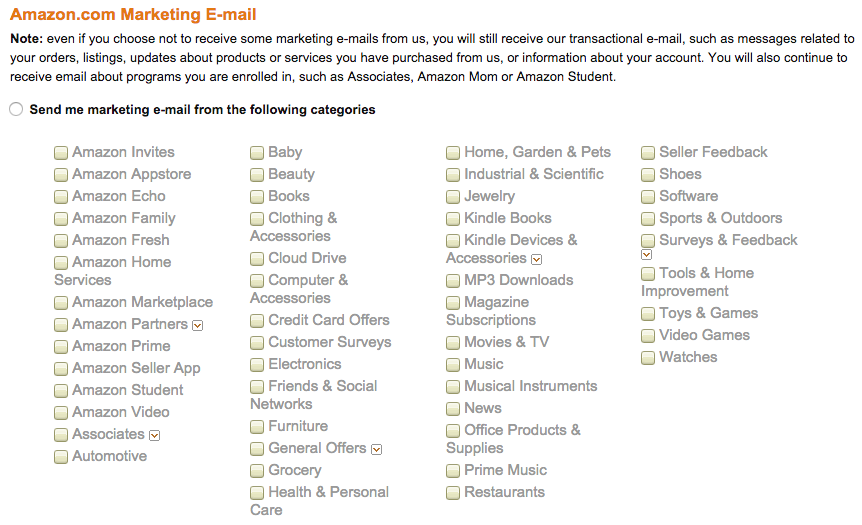
Here’s an example from Amazon:

amazon-marketing-email-categories

You can ask your audience to indicate their preferences when signing up – and give them plenty of opportunities to update those preferences by including a CTA in your emails.

By asking your subscribers to indicate their preferences, you can easily cut through the noise by targeting your audience based on their real interests.

You can create custom subscriber preferences with email marketing tools like Mailchimp or Campaign Monitor.

Then, just add the preferences tags to every email you send out.

Conclusion

Email marketing segmentation isn’t a tactic reserved only for brands with the most advanced marketing automation software. With a simple email marketing service and a bit of creativity, you can start targeting your audience with these easy segmentation strategies today.

Know of any other easy ways to segment? Let us know in the comments below.

About the Author: Andrew is the co-founder and director of Online Marketing Gurus, a fast-growing, award-winning search company working with brands including HelloMolly, Baku Swimwear, and Forcast. Follow him on Twitter at @andrewraso1 or on LinkedIn.


from The Kissmetrics Marketing Blog http://ift.tt/1RXTxDo
via IFTTT
Save Time & Automate with the Benchmark Email Zapier Integration

Make things easier for yourself and connect any app with your email marketing account thanks to the Benchmark Email Zapier integration to speed up your workflow and improve customer engagement.Related Articles
  1. Benchmark Email's Super Integration With Zapier
  2. Social Media Integrations with Zapier
  3. Benchmark Email Zapier Integration


from Benchmarkemail Blog http://ift.tt/1UQe25M
via IFTTT